
Skip to content
  • My Courses
  • Home
  • Our Book Reviews
  • Our School library
  • Login
  • Register
  • My KEDU School
    • About Us
    • PreJuniors KEDU
    • Join our team!
  • My Courses
  • Login
  • Contact us
  • Home
  • My Courses
  • Teachers
  • KEDU Teacher Handbook

KEDU Teacher Handbook

Curriculum

  • 6 Sections
  • 35 Lessons
  • Lifetime
Expand all sectionsCollapse all sections
  • 🕺🏼Welcome to KEDU Language School
    Welcome to KEDU Language school. We would like you to know what KEDU means to us and what our philsophy of learning is.
    4
    • 2.1
      🎩Welcome Note
      2 Minutes
    • 2.2
      🏠Our philosophy & commitment
      5 Minutes
    • 2.3
      👪Our obligations
      5 Minutes
    • 2.4
      🧑🏼‍🦰Your obligations
      5 Minutes
  • 🧠Basic Knowledge Toolkit
    Get to know our school, inside and out.
    8
    • 3.1
      🚀Behind the Space Platform philosphy
      15 Minutes
    • 3.2
      🏈Where things are
      2 Minutes
    • 3.3
      ⌛How they work
      1 Minute
    • 3.4
      📖Interactive Vocabulary Notebook
      5 Minutes
    • 3.5
      📂Wordlists and teacher platform
    • 3.6
      ✅❎Assessment methodology
    • 3.7
      🧑🏼‍🎓Teacher Training & Portfolio
    • 3.8
      🧑🏻‍🤝‍🧑🏼👪Parent teacher meetings
  • 🎨Materials, Consumables and Library area
    Fantastic materials, props. consumables and where to find them. Sometimes finding the materials for your lesson plan can resemble something out of a Harry Potter book. This place will let you see our inventory and allow you to plan for your lessons with ease.
    5
    • 4.1
      🐻Fantastic Props & Equipment and where to find them
      5 Minutes
    • 4.2
      🐗Fantastic Games & Board games and where to find them
    • 4.3
      🐗Fantastic Consumables and where to find them
    • 4.4
      📚Our Library inventory & loaning philosophy
      2 Minutes
    • 4.6
      🖇️Our teaching resources inventory
  • 📃Recommended activities and Lesson plans
    This is where your teaching briefcase starts.
    7
    • 5.1
      🏒Indoor & ⚽🥅Outdoor activities
    • 5.2
      🎭Drama & 👯🕺🏼Kinesthetic activities
    • 5.3
      🎟️Myrsini’s Village activities
    • 5.4
      🥽🧬Our S.T.E.A.M program
      5 Minutes
    • 5.5
      👩🏼‍🎨Arts & Crafts – Construction activities
    • 5.6
      🧑🏼‍🍳Cooking Activities
    • 5.7
      🧠Our Deeper Learning program
  • 🚀Space platform training
    All you need to know about our Space Student Platform
    8
    • 6.1
      ♥️How to add Homework to a class
    • 6.2
      🚀Space and first time use in class
      5 Minutes
    • 6.3
      🧑🏼‍🎓How to add students to My Class
      5 Minutes
    • 6.4
      How to connect (not completed)
    • 6.5
      How to use your digital classroom (not completed)
    • 6.6
      How to make videos (not completed)
    • 6.7
      How to use bit.ly (not completed)
    • 6.8
      How to use Canva (not completed)
  • 🧑🏼‍🎓Suggested links and lesson plans
    Here you will find a wide variety of links to various resources on the internet
    3
    • 7.1
      Cambridge Young learner links for teachers
      10 Minutes
    • 7.2
      🚀Cambridge- Practice makes perfect lesson plans
    • 7.3
      Teachthis lesson plans

🚀Space and first time use in class

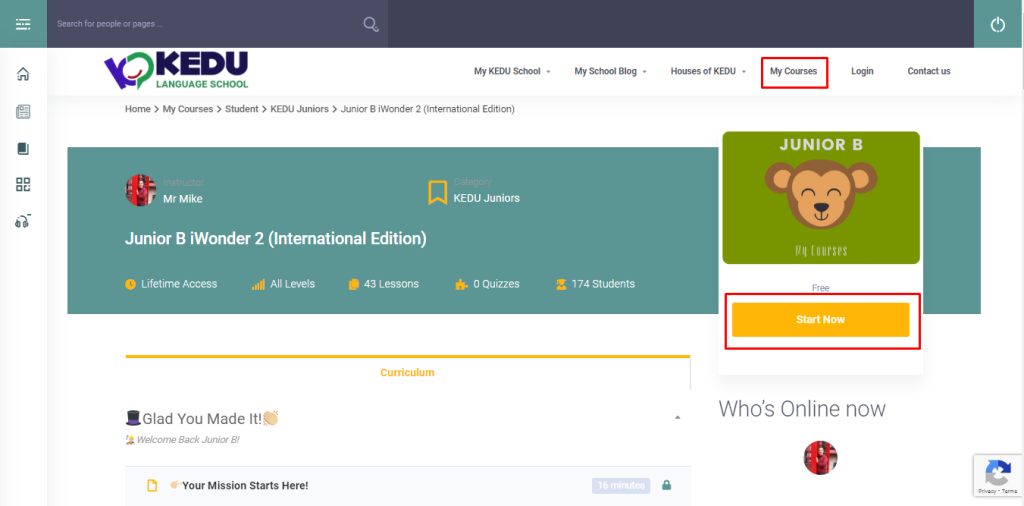
When your students have to use My Courses the first time they have to press ‘Start now to enrol in that course. I suggest showing this on the board and in the first lesson to assign registering as homework.

Homework:

To use My Courses and wordlists, please open Kedu.space and login in. Go to My Courses from the dashboard or any menu, choose your class and press ‘Start now‘.

Μπορείτε να αντιγράψετε το κείμενο στα Ελληνικά στην τάξη σας!

Κάθε χρόνο αλλάζουμε τάξεις και πρέπει να ενημερώνουμε το Kedu.space ότι αλλάξαμε τάξη!
Για να κάνετε τα μαθήματά σας και τις δραστηριότητες με τις λέξεις, ανοίξτε το Kedu.space και συνδεθείτε.
Μεταβείτε στο My Courses από το μενού, επιλέξτε νέο σας επίπεδο π.χ Junior B και πατήστε το κίτρινο κουμπί “Start now”.
Δείτε την εικόνα για περισσότερες πληροφορίες!

Κάνετε δεξί κλικ αποθήκευση ως στον υπολογιστή σου και ανεβάσετε την εικόνα με το μήνυμα σας!
Leave a Comment Cancel Comment

Your email address will not be published.

♥️How to add Homework to a class
Prev
🧑🏼‍🎓How to add students to My Class
Next

KEDU English school

Mr Mike Kenteris

Chrysomallousis Str. 17
Mytilene, Lesvos
Greece.
Tel.: +30.22510.37133

Site is designed by Dr Mike Kenteris and supported by Target Point.
Login to your Account
    Forgot my Password